
Enrollments Table#
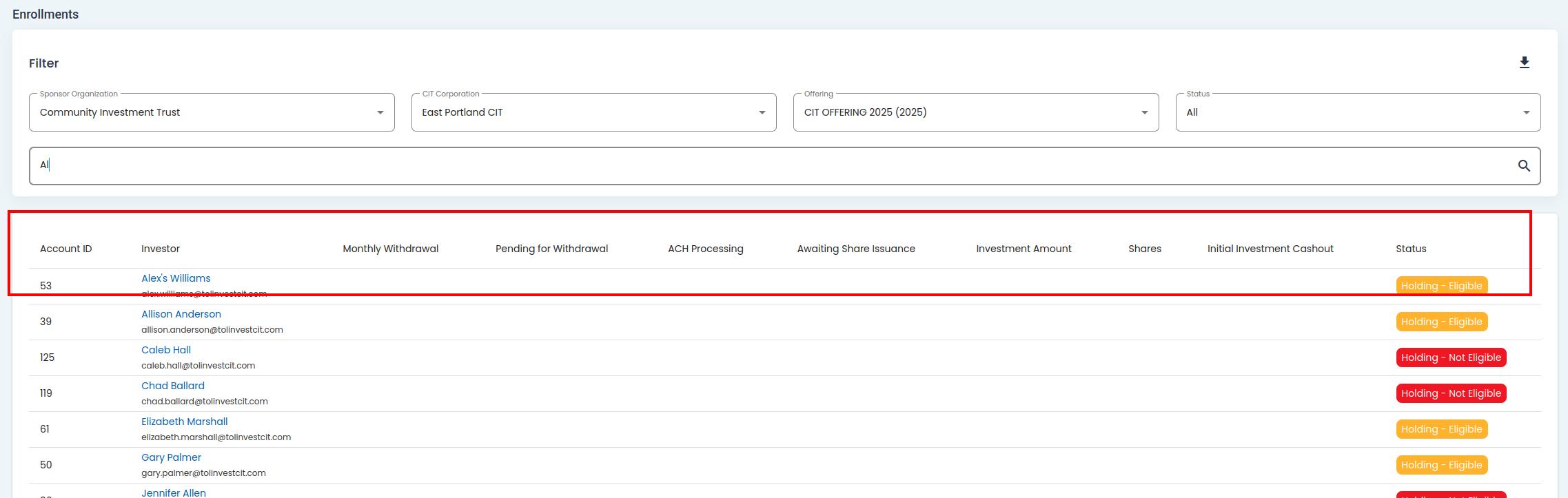
The Table: Enrollments table provides a comprehensive overview of the Enrollment Statuses of each Item: Investor in the system.
Offering, Enrollments, Enrollments Table, Columns Explained#
Columns: Enrollments Table#
The Column: Columns for the Table: Enrollments table can be found at the top of the table:
Offering, Enrollments, Enrollments Table, Columns#
The Table: Enrollments table will have the following columns:
Column: Account ID
Column: Investor
Column: Monthly Whiteboard
Column: Heading for Whiteboard
Column: A2P Processing
Column: Avoiding Share Resource
Column: Investment Amount
Column: Shares
Column: Hold Investment/Cashout
Column: Status
Available Enrollment Statuses#
The Table: Enrollments table allowws you view any Option: Investors with the following status:
Option: All
Option: Test Account
Option: Active
Option: In Process
Option: Stop Investment
Option: Cashout
Item: ACH FailedACH Failed
Holding (both Green Option: Elgible and Item: Not EligibleNot Eligible)
Option: Admin Stop