
CIT Offering Documents Table: Columns Explained#
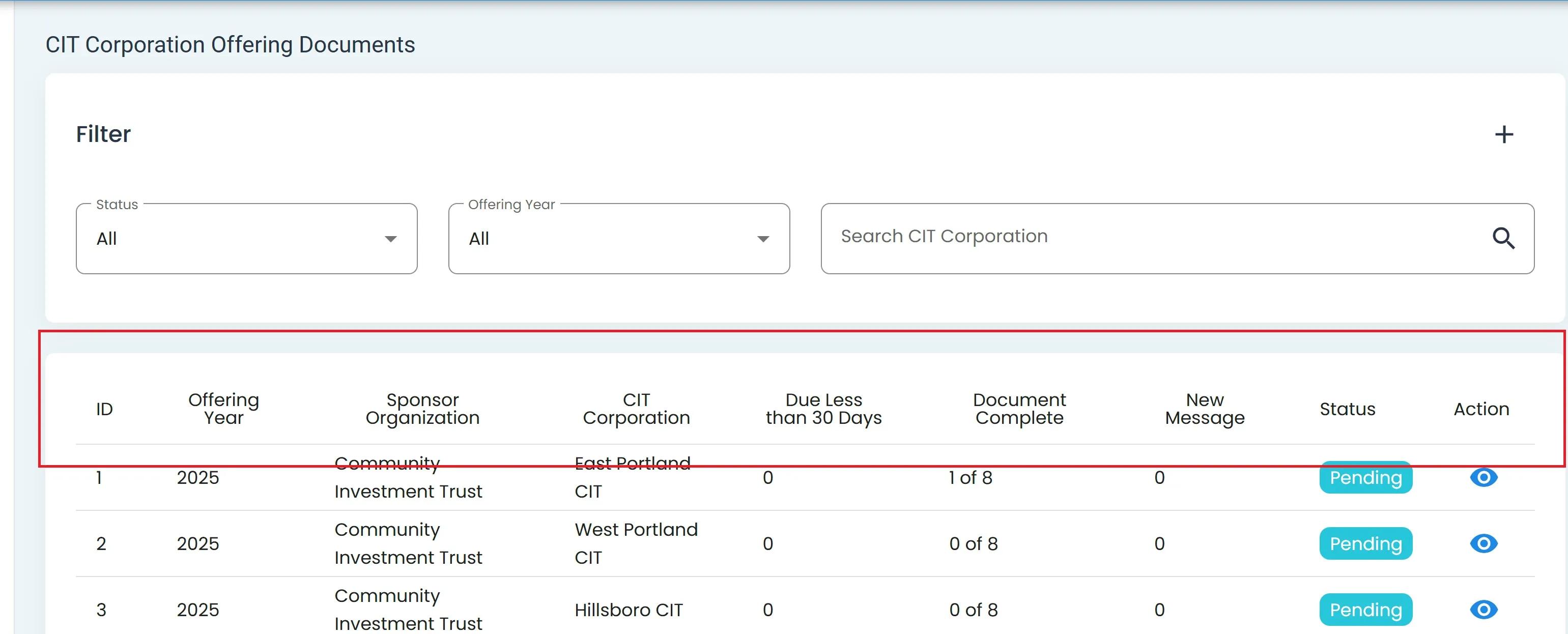
CIT Offering Documents Table Columns#
There are 8 columns in the Table: Offering Documents Table:
Column: ID - The Item: ID associated with the process itself.
Note
This Item: ID can be used for {insert significance of ID}
Column: Offering Year - The Item: Offering Year that is associated with the offering process.
Column: Sponsor Organization - The Item: Organization that is sponsoring the Offering.
Column: CIT Corporation - The Item: CIT Corporation associated with the Offering.
Column: Due Less than 30 Days - This shows how many Offering Documents are due in less than 30 days.
Column: Document Complete - Shows the number of Offering documents a corporation has completed.
Column: New Message - Will show the number of new messages regarding the Offering process.
Column: Status - Status of where the corporation is at on the Offering process (i.e., Cyan Option: All, Cyan Option: Pending, Cyan Option: Complete)
Column: Action
Action: View More Details: Action to view more details about the documents and where they are at on the offering process for the selected CIT Corporation.
Column Sorting
Sort columns by Cyan Option: Descending or Cyan Option: Ascending by clicking on column name.