
Ctrl+K
CIT Services User Manual - Home
  • Community Investment Trust (CIT) Documentation for Community Members
  • My Accounts
    • Identifying the Current Account
  • Dashboard
    • CIT Corporation Summary Table
    • CIT Corporation Cashout Table
    • CIT Corporation Summary (or Cashout) Table
  • Profile
    • Name and Contact Information
    • Primary Address
    • Mailing Address
  • User
    • Users
      • Users Homepage Location
    • Staff
      • Staff Homepage Location
  • Account
    • CIT Corporations List
      • Table: CIT Corporations List
      • View CIT Corporation Details
        • Corporation Information Tab
        • Legal Information Tab
        • Users Tab
    • Investors
      • View Investor Details
        • Beneficiaries Tab
        • Investor Details Tab
        • Holdings List Tab
        • Documents List Tab
  • Document
    • CIT Corporation Onboarding Documents
      • CIT Onboarding Documents Table: Columns Explained
      • Status Filters for Onboarding Documents Table
      • Action: View More Details
    • CIT Corporation Offering
      • CIT Offering Documents Table: Columns Explained
      • CIT Offering Status Filter
      • View More Details
    • Investor Documents
    • View More Details: Documents
      • View Details: Tabs Explained
      • View Details: Cards Explained
  • Offering
    • Offerings
    • Enrollments
      • Enrollments Table
        • Using Enrollments Filters
        • Using Enrollments Search
  • Investment
    • Investor Summary
    • Monthly and Quarterly Investment Summary
  • Communication
  • Dividend
    • Dividends
    • Cash Payouts
  • Transaction
    • Directives
      • How to Filter by Status or Sponsor Organization
      • Viewing Directive Details
    • Complete Transactions
  • Billing
    • Invoices
    • Payments
      • Viewing Payment Details
      • Adding Payment Credits
  • Settings
  • Proxy

Legal Information Tab

  • Information Available in the Legal Tab
  • Editing Legal Information for CIT Corporations

Legal Information Tab#

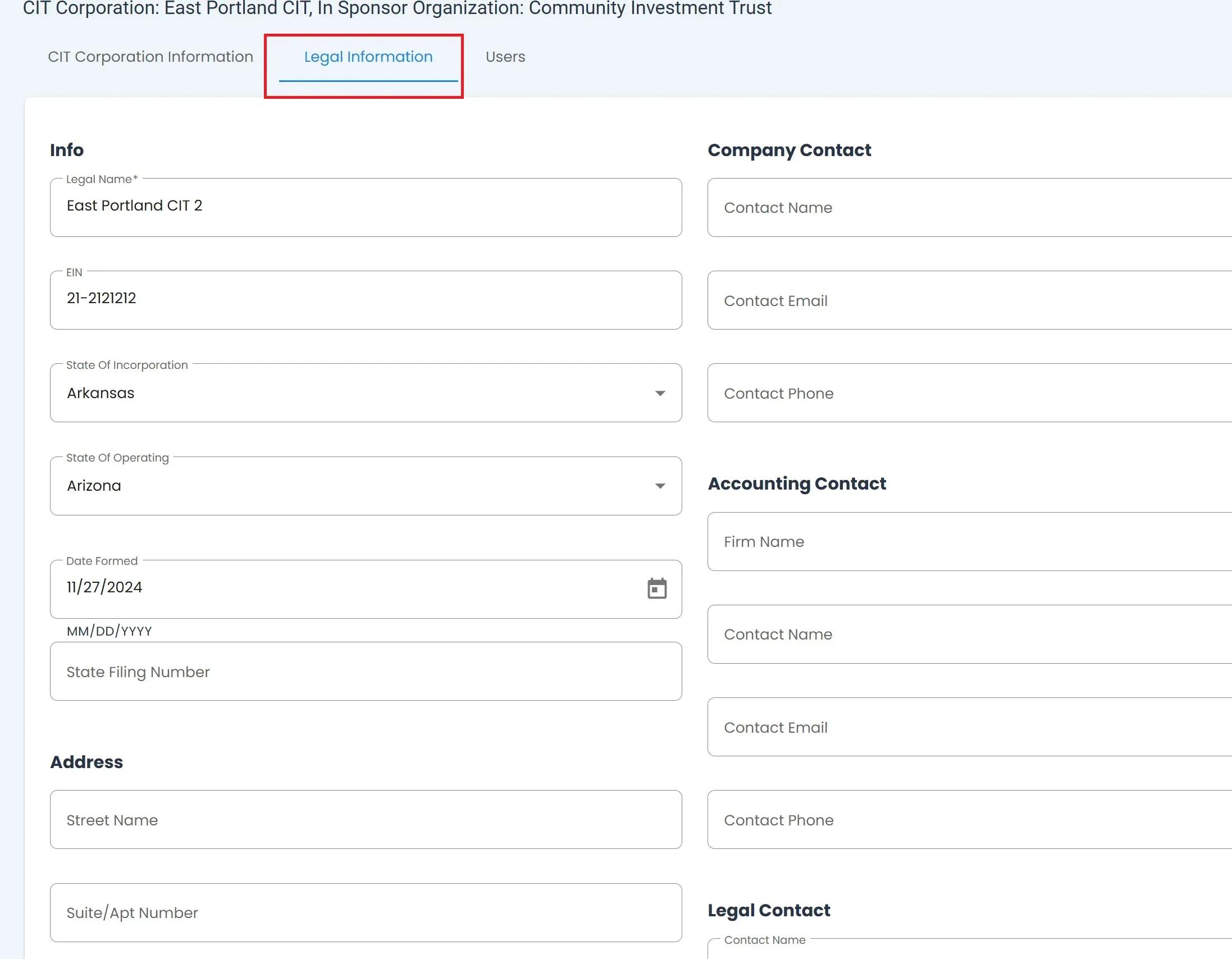
The Tab: Legal Information tab is the second tab inside the View Account Details section.
../../../_images/legal-information-tab-location.jpeg

CIT Corporation, Legal Information Tab#

Information Available in the Legal Tab#

The Tab: Legal Information tab allows you to view and the following information about a given Item: CIT Corporation:

  • Item Required: Legal Name

  • Tab: EIN

  • Tab: State of Incorporation

  • Tab: State of Operating

  • Tab: Date Formed

  • Tab: State Filing Number

In addition, this tab allows you to view and edit a Item: CIT Corporation’s:

  • Tab: Address,

  • Tab: Company Contact,

  • Tab: Accounting Contact, Or

  • Tab: Legal Contact.

Editing Legal Information for CIT Corporations#

  1. Place cursor in the field you want to edit.

  2. Input the desired information.

  3. Click Save Changes at the bottom of the page.

Trying to Edit Other Company Information?

  • See Editing Company Information to learn more about editing your company’s profile information.

previous

Corporation Information Tab

next

Users Tab

  • Information Available in the Legal Tab
  • Editing Legal Information for CIT Corporations

© Copyright 2024, Transfer Online..